Bowling 3D Pro
EivaaGamesSports
4.62.95K Reviews
- Version
- 2.12
- Installs
- 1.00M
- Age Rating
- Everyone
Screenshots
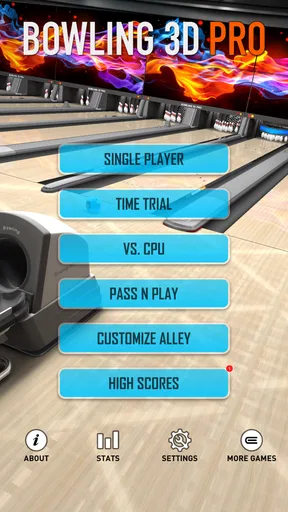
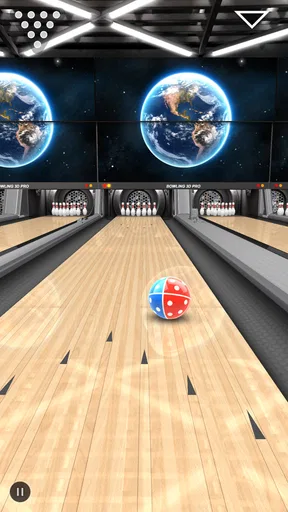
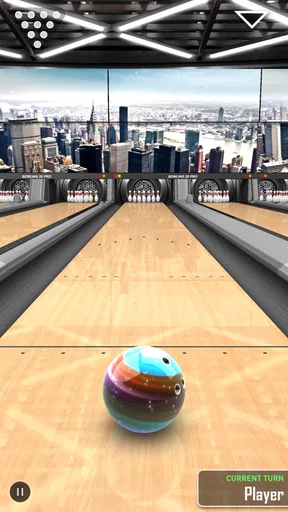
Our Review of Bowling 3D Pro
 Analysis by Appyee
I spent time with Bowling 3D Pro as a casual sports game, and my first impression was clear: it is built for quick bowling sessions rather than a deep simulation career. The presentation aims for a realistic three-dimensional feel, while the controls keep the central action easy to understand. You pick up a ball, line up a shot, add your throw, and watch the result unfold. That simplicity makes it approachable, but it also means the game’s appeal depends heavily on whether you enjoy repeating the core bowling challenge.
Developed by EivaaGames, this free game sits in the sports category and is suitable for Everyone. It has been available since December 1, 2015, and its current version is 2.12. The Android requirement is 5.1 or later, so it can work on a wide range of devices that are no longer considered new. That broad compatibility is useful for anyone looking for a lightweight game to keep on an older phone or tablet.
How the free experience feels in everyday play
The most important cost detail is straightforward: you can start playing without paying. Optional in-app purchases are listed at $2.99 per item, so the basic entry point is free while certain extras or upgrades may require a separate purchase. I appreciate that distinction because it lets a new player test the controls and decide whether the bowling itself is enjoyable before spending anything.
I would not treat the free price as proof that the game is unlimited or completely free of friction. The purchase option means the full experience may be more attractive to players who are willing to pay for selected additions. At the same time, the listed price structure does not turn the game into a mandatory purchase. For a short break, the no-cost starting point is the main value.
In practical terms, this is the kind of game I would install before a trip, a waiting-room visit, or a quiet evening when I wanted something interactive but not demanding. A typical session can begin with one quick attempt and naturally continue if I start chasing a better score. That makes it more convenient than a large sports title that expects a long setup, a permanent internet connection, or a serious time commitment.
The free access also changes how I judge it against paid bowling games. A paid alternative may offer a more elaborate presentation or a wider sense of progression, but it asks me to commit before I know whether its throwing model suits me. Here, I can make that decision through play. If I dislike the feel of aiming or releasing the ball, I have not paid an entry fee to discover it.
Learning the throw instead of relying on luck
The central skill is not simply choosing a direction. A good result depends on how I combine alignment, timing, and force. Early attempts can feel inconsistent because a small change in the starting line or release can move the ball away from the pocket. I found it more useful to treat each throw as a test: change one part of the motion, observe the pins, and keep the adjustment that produced a cleaner result.
That approach reveals one of the game’s better qualities. It offers a compact practice loop without requiring a tutorial-heavy structure. I can improve by paying attention to my own mistakes rather than memorizing a complicated control system. If the ball repeatedly drifts to one side, I know the answer is not simply “throw harder.” I need to correct the setup or release and then compare the next result.
A useful routine is to begin with controlled throws instead of immediately attempting dramatic strikes. I first focus on sending the ball along a repeatable line. Once that feels stable, I add more ambition by changing the angle or force. This is especially helpful on a touchscreen, where the same gesture can feel slightly different depending on how quickly I perform it.
Another practical tip is to judge a session by consistency rather than by one lucky strike. One excellent frame can be satisfying, but a repeatable approach tells me more about whether I am actually learning the game. Players who enjoy small mechanical improvements will probably find more depth here than players who only want instant spectacle.
Why the three-dimensional presentation matters
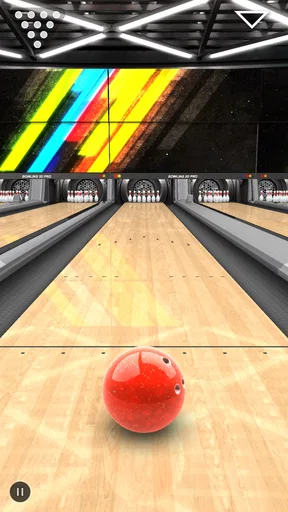
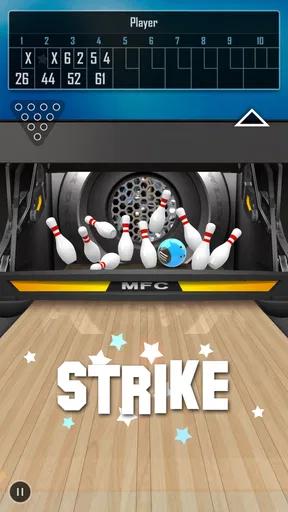
The visual style is one of the reasons the game remains pleasant for short sessions. The three-dimensional bowling environment gives the lane, ball, and pins a more convincing sense of space than a flat arcade layout would. That matters because bowling depends on reading distance and direction. Even without turning the game into a full simulation, the visual perspective helps the shot feel like a physical action.
I would describe the graphics as useful rather than overwhelming. They support the game’s purpose instead of distracting from it with excessive menus or unrelated effects. The result is easy to understand at a glance: the lane is the focus, the pins are the target, and the throw is the decision that matters.
There is a trade-off in that restrained design. Anyone expecting a complete bowling venue, a dramatic sports broadcast, or a large collection of presentation options may find the experience modest. The realistic 3D goal works best when it is judged against casual mobile bowling, not against a console sports production.
Where it fits beside other bowling choices
Compared with a purely arcade bowling game, this one asks me to care more about the line and delivery. An arcade-focused alternative may reward exaggerated effects, rapid rounds, or unusual power-ups. Bowling 3D Pro feels better suited to someone who wants the basic act of bowling to remain recognizable. The satisfaction comes from improving the shot, not from turning every frame into a visual stunt.
Compared with a full sports simulator, however, it is easier to enter and less intimidating. I do not need to learn a large collection of systems before attempting a frame. That is a real advantage for casual players, children, and anyone who wants a short session. The downside is that dedicated simulation fans may eventually want more strategic variety than a compact mobile game can provide.
It also differs from playing at a real bowling alley in an important way: there is no physical ball weight, lane texture, or body movement to interpret. The touchscreen gesture stands in for those sensations. That makes it convenient but less tactile. If the physical rhythm of bowling is what you love most, no mobile control scheme can fully replace it.
Small habits that make the game more enjoyable
I recommend holding the device steadily and using the same hand position from one attempt to the next. This sounds obvious, but consistency matters when the game asks for a gesture-based throw. If I change my grip, angle, and speed all at once, I cannot tell which choice affected the result.
It is also worth playing in short blocks when the controls begin to feel repetitive. The game works well as a five-minute distraction, but a longer session can expose the limited nature of its main loop. Taking a break helps preserve the feeling of improvement instead of turning every frame into a routine tap.
For younger players, the Everyone rating makes the game an uncomplicated choice from a content perspective. I would still encourage an adult to check the purchase settings on the device, particularly because optional items cost $2.99 each. The game itself is easy to explain, but spending controls are always worth handling before handing a phone to a child.
For older devices, the minimum operating-system requirement is helpful, although performance can still vary from one handset to another. I would close other demanding apps if the game feels sluggish, and I would avoid judging the controls during a moment when the phone is already struggling. A stable response is important in a game where a small gesture affects the shot.
What the player base suggests, and what it does not guarantee
The game has an average rating of 4.6 from around 18 thousand ratings, with roughly 3 thousand written reviews, and it has passed 1 million installs. Those figures tell me that it has reached a substantial audience and that many players have found the basic experience worthwhile. They are useful signals when deciding whether a free download deserves a trial.
They do not guarantee that every player will enjoy the same control feel. Bowling is particularly sensitive to personal preference: some people want a forgiving arcade throw, while others prefer a more deliberate line-and-force challenge. I would use the strong reception as a reason to try it, not as a substitute for deciding whether its pace matches my taste.
Who will get the most value
I think the best audience is made up of casual sports-game players who want a recognizable bowling activity without a large commitment. It is also a good fit for someone who enjoys practicing a simple mechanic and gradually making fewer mistakes. The free starting point lowers the risk, and the age rating makes it broadly accessible.
It can work well for families sharing a device, provided purchases are managed properly. A child can understand the objective quickly, while an adult can still enjoy trying to improve accuracy. The game is also suitable for people who prefer offline-style, self-contained entertainment over competitive online pressure, although I would not install it expecting a social league experience.
Players using an older compatible phone may find its broad operating-system support appealing. Likewise, anyone who needs a small sports game for occasional use can benefit from the straightforward format. It does not demand the same attention as a long campaign, and a player can return after several days without needing to relearn a complicated system.
Who should probably skip it
I would skip it if your main reason for playing bowling games is deep career management, detailed equipment customization, or a broad competitive structure. The appeal here is the throw itself. If you need a game to provide a long-term sports identity with many layers beyond bowling, a larger paid or console-style alternative may be a better match.
I would also be cautious if you dislike gesture controls. Even a well-presented bowling game cannot remove the uncertainty of translating a physical motion into a touchscreen action. Some players will find that process satisfying; others will see it as imprecise. Trying the free version is the sensible way to settle that question.
Finally, players who want constant novelty may run out of enthusiasm sooner than players who enjoy repetition with refinement. The same core action is both the game’s strength and its limitation. I found value in improving the delivery, but someone looking for frequent new mechanics may consider the experience too narrow.
My buying decision after playing
My verdict is positive, with a clear condition: I would recommend starting with the free version and paying only if a listed purchase directly improves the way you want to play. The no-cost entry makes the decision easy, while the $2.99-per-item structure means I would avoid buying anything impulsively. First confirm that the controls feel natural, then decide whether the extra value is meaningful to you.
The strongest reason to try it is the balance between immediate access and a skill-based bowling loop. I can begin quickly, practice a particular weakness, and return for another attempt without learning an oversized system. The three-dimensional presentation gives the shots enough visual presence to feel more engaging than a bare-bones score counter.
My main reservation is longevity. The game is much easier to recommend as a reliable casual pastime than as a complete replacement for a full bowling simulation. Its value is highest when I want a focused activity for a few minutes, not when I expect a constantly expanding sports world.
In the end, I would suggest Bowling 3D Pro to a friend who wants free, accessible mobile bowling and enjoys improving through repetition. I would point a serious simulation fan toward a deeper alternative, and I would tell anyone unsure about touchscreen accuracy to test the free access before considering an optional purchase. For the right player, that is a fair deal: no upfront commitment, a clear central challenge, and enough realism in the presentation to make each well-delivered shot feel earned.
Verdict
Strengths of Bowling 3D Pro
- Realistic 3D lanes and physics make shots feel satisfying.
- Multiple bowling environments add visual variety to matches.
- Simple controls are easy for beginners to learn quickly.
- Suitable for short sessions when you have only a few minutes.
- Offline play makes it convenient without a reliable internet connection.
Limitations of Bowling 3D Pro
- Advanced techniques may feel limited compared with full bowling simulators.
- Some levels or features may require extra progression to unlock.
- Precision can be difficult on smaller phone screens.
- Visual quality may vary noticeably between older and newer devices.
- Repeated matches can become predictable after extended play.
Other Releases by EivaaGames
View All
Real Pool 3D
Sports4.4

Putt Golf
Sports4.0
Similar Picks in This Category
View All
8 Ball Pool
Miniclip.com4.8

Pooking - Billiards City
AIM TOP GAME TECHNOLOGY LIMITED - pool4.6

Carrom Pool: Disc Game
Miniclip.com4.4

EA SPORTS FC Soccer Mobile 26
ELECTRONIC ARTS4.6

World Soccer League
mobirix4.3

Soccer Cup 2026: Football Game
INLOGIC SPORTS - football tennis golf soccer4.3
Frequently Asked Questions
What is Bowling 3D Pro, and how does the game work?
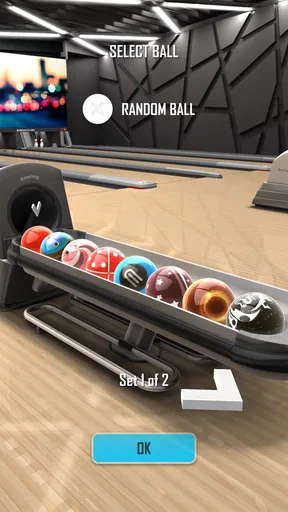
Bowling 3D Pro is a mobile bowling game designed to recreate the basic experience of playing on a real lane. You choose a ball, aim toward the pins, adjust the direction and spin, then swipe or use the game’s controls to roll. It usually focuses on quick matches, realistic pin reactions, and simple controls, making it suitable for both casual players and bowling fans.
Is Bowling 3D Pro suitable for beginners?
Yes, Bowling 3D Pro is generally easy to understand for beginners because its core gameplay is straightforward. New players can learn the aiming and throwing mechanics after only a few attempts. However, getting consistent strikes may require practice, especially when using spin or adjusting for lane conditions. The game can therefore be enjoyed casually while still offering room to improve.
Can I play Bowling 3D Pro without an internet connection?
Whether Bowling 3D Pro works fully offline can depend on the version and platform you install. Basic bowling modes may be available without a constant connection, but advertisements, online competitions, leaderboards, cloud features, or certain multiplayer options may require internet access. It is best to check the app’s store description and test the main modes before relying on it for offline play.
Does Bowling 3D Pro include multiplayer or competitive features?
Bowling 3D Pro may offer competitive elements such as score challenges, tournaments, leaderboards, or matches against computer-controlled opponents, depending on the installed version. Some editions may also include online or local multiplayer, while others are primarily single-player experiences. Players interested in competing with friends should confirm the current feature list because multiplayer availability can vary between Android and iOS releases.
Is Bowling 3D Pro free to download, and does it contain advertisements or in-app purchases?
Bowling 3D Pro may be available as a free download, but free versions commonly include advertising and optional purchases. Ads can appear between games or when accessing particular rewards, while purchases may unlock extra balls, remove advertisements, or provide additional content. Before downloading, review the app store listing for pricing, permissions, subscription details, and whether purchases are optional or required.
Play our best games!


